

Mastering TOGAF 10: A Modular Guide to Enterprise Architecture with Visual Paradigm
Introduction
Enterprise Architecture (EA) has long been viewed as a complex, often intimidating discipline. For years, practitioners navigated massive, single-volume standards like TOGAF 9.2, which, while comprehensive, often felt overwhelming to new adopters and rigid for modern, agile organizations. The release of TOGAF Standard, 10th Edition marked a paradigm shift, moving away from the “one-size-fits-all” tome toward a modular, flexible documentation structure.
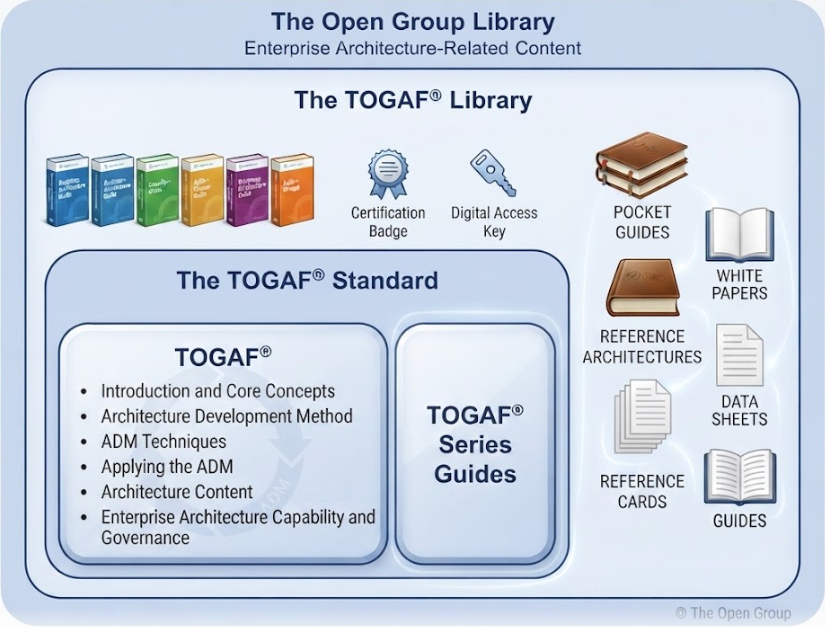
This guide explores the philosophy behind TOGAF 10’s modular design, breaks down its three-tier hierarchy, and provides a practical roadmap for adoption. Crucially, we will demonstrate how to bring these concepts to life using Visual Paradigm, a leading EA tool that seamlessly integrates with the TOGAF Architecture Development Method (ADM). Whether you are an Enterprise Architect, a team leader, or a sponsor, this guide will help you navigate the new standard and leverage tooling to accelerate your architecture practice.
Section 1: The Philosophy of Modularity (Why the Shift?)
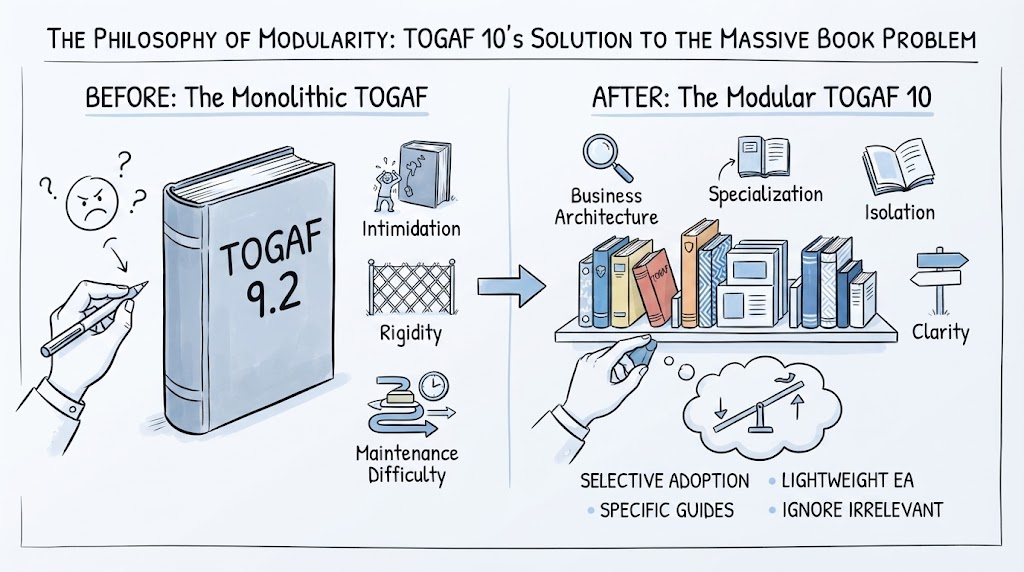
The Massive Book Problem
Previous editions of TOGAF, particularly 9.2, were often criticized for their sheer volume. The standard was presented as a single, dense document that attempted to cover every conceivable aspect of enterprise architecture. This approach created several challenges:
-
Intimidation Factor: New practitioners often felt overwhelmed by the breadth of content.
-
Rigidity: Organizations felt pressured to adopt the entire standard, even if only specific parts were relevant to their context.
-
Maintenance Difficulty: Updating a monolithic document meant republishing the entire standard, slowing the incorporation of new ideas.
The 10th Edition Solution: Modularity
TOGAF 10 addresses these issues by dividing the documentation into separate, manageable modules. This modular approach offers several key benefits:
-
Specialization: Different teams can focus on the modules most relevant to their work (e.g., security teams focusing on security guides, business architects on business architecture guides).
-
Isolation: Updates to one module (e.g., adding new agility practices) do not require changes to the core fundamental content.
-
Clarity: Each module has a clear purpose and audience, making it easier to find specific guidance.
The Freedom to Choose
Perhaps the most significant advantage of modularity is selective adoption. Organizations are no longer forced to implement the entire TOGAF framework. Instead, they can:
-
Adopt only the Fundamental Content for a lightweight EA practice.
-
Select specific Series Guides that address their current challenges (e.g., Digital Transformation or Security).
-
Ignore modules that are irrelevant to their industry or maturity level.
This flexibility allows TOGAF 10 to scale from small startups to large multinational corporations, adapting to unique needs rather than forcing a rigid template.
Section 2: The Three-Tier Hierarchy (From Universal to Unique)
TOGAF 10 organizes its content into a three-tier hierarchy, guiding organizations from universal principles to customized implementations.
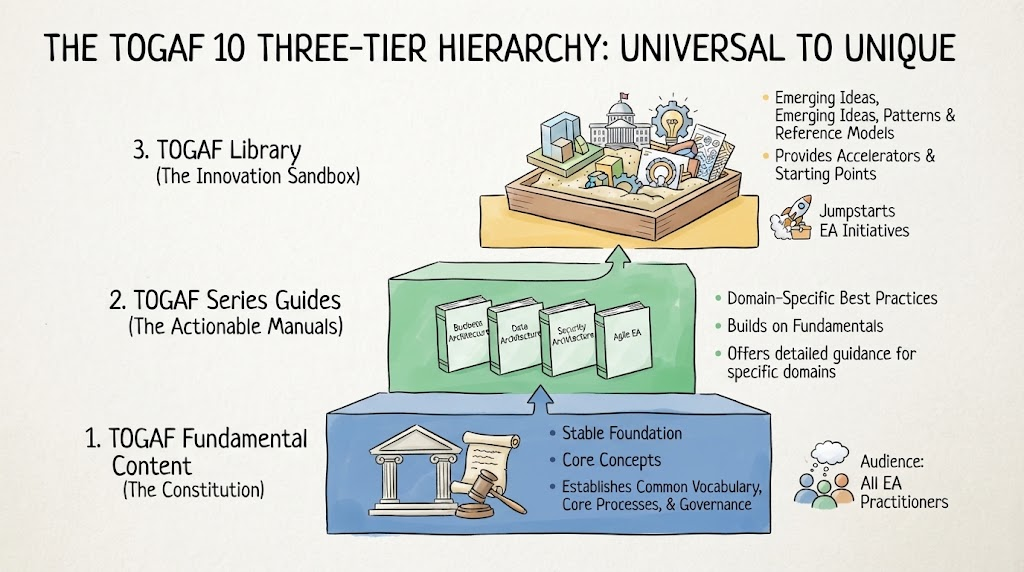
1. TOGAF Fundamental Content (The Constitution)
This tier contains the core, universally applicable concepts of Enterprise Architecture. It is stable, enduring, and forms the foundation of the standard. Think of it as the “constitution” of EA—essential principles that rarely change.
-
Audience: All EA practitioners.
-
Purpose: Establishes common vocabulary, core processes, and governance structures.
2. TOGAF Series Guides (The Actionable Manuals)
These guides provide actionable, domain-specific best practices that build upon the fundamentals. They are more dynamic and updated frequently to reflect emerging trends.
-
Examples: Business Architecture Guide, Data Architecture Guide, Security Architecture Guide, Agile EA Guide.
-
Purpose: Offers detailed guidance on applying EA principles to specific domains or methodologies.
3. TOGAF Library (The Innovation Sandbox)
The Library is a collection of emerging ideas, templates, patterns, and industry-specific reference models. It serves as a sandbox for innovation and experimentation.
-
Examples: Digital Business Reference Model, Government Reference Model, Industry-specific templates.
-
Purpose: Provides accelerators and starting points for organizations looking to jumpstart their EA initiatives.
Section 3: Deep Dive into the Fundamental Content (The “Must-Knows”)
The Fundamental Content consists of six core documents that form the heart of TOGAF 10. Understanding these is essential for any practitioner.
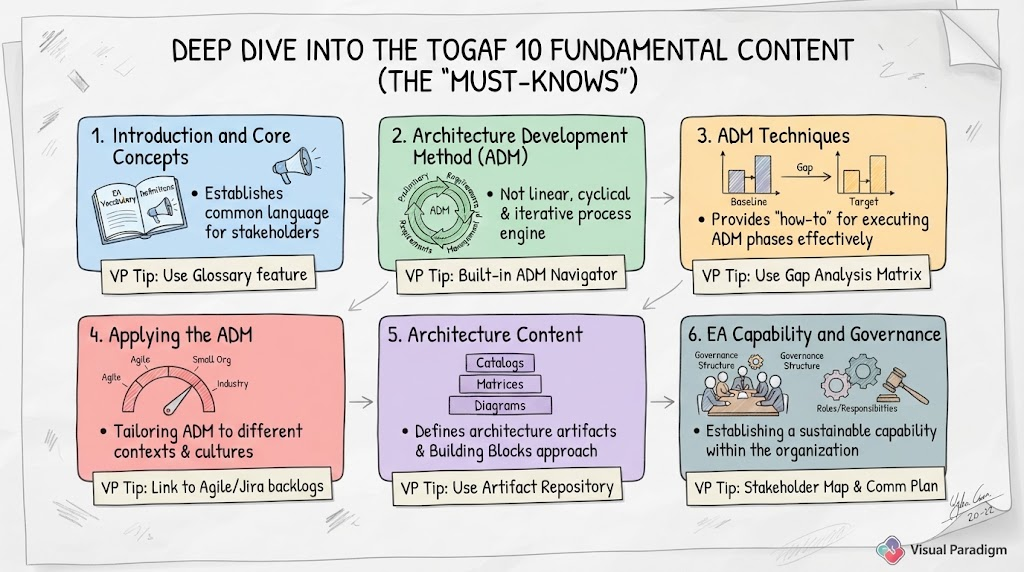
1. Introduction and Core Concepts
-
Content: Executive overview, key definitions, and the basic vocabulary of EA.
-
Key Concept: Establishes a common language for stakeholders.
-
Visual Paradigm Tip: Use VP’s Glossary feature to maintain a centralized repository of terms, ensuring consistency across all architecture artifacts.
2. Architecture Development Method (ADM)
-
Content: The repeatable, iterative process engine for developing enterprise architectures. It consists of phases from Preliminary to Requirements Management.
-
Key Concept: ADM is not linear; it is cyclical and iterative, allowing for continuous refinement.
-
Visual Paradigm Tip: VP provides a built-in ADM Navigator that guides users through each phase, ensuring no step is missed. You can create ADM projects directly from the toolbar, selecting the TOGAF 10 template.
3. ADM Techniques
-
Content: Specific techniques to support ADM execution, such as Gap Analysis, Stakeholder Management, and Business Scenario.
-
Key Concept: These techniques provide the “how-to” for executing ADM phases effectively.
-
Visual Paradigm Tip: Use VP’s Gap Analysis Matrix to visually compare baseline and target architectures. The tool auto-generates heatmaps and difference reports, saving hours of manual work.
4. Applying the ADM
-
Content: Guidance on tailoring the ADM to different contexts, such as Agile environments, small organizations, or specific industries.
-
Key Concept: One size does not fit all; ADM must be adapted to fit the organization’s culture and pace.
-
Visual Paradigm Tip: VP supports Agile integration by linking ADM artifacts to user stories and backlogs in tools like Jira. This allows architects to maintain traceability between high-level architecture and agile delivery.
5. Architecture Content
-
Content: Defines the types of architecture artifacts (catalogs, matrices, diagrams) and the Building Blocks approach.
-
Key Concept: Architecture is communicated through structured artifacts that provide clarity and consistency.
-
Visual Paradigm Tip: Use VP’s Artifact Repository to store and manage all architecture building blocks (ABBs) and solution building blocks (SBBs). The tool ensures reusability and version control.
6. Enterprise Architecture Capability and Governance
-
Content: Guidance on setting up and running the EA function, including roles, responsibilities, and governance structures.
-
Key Concept: EA is not just about diagrams; it’s about establishing a sustainable capability within the organization.
-
Visual Paradigm Tip: Use VP’s Stakeholder Map and Communication Plan templates to define and manage stakeholder engagement. The tool helps visualize influence and interest levels, aiding in effective governance.
Section 4: Navigating the Series Guides and the TOGAF Library
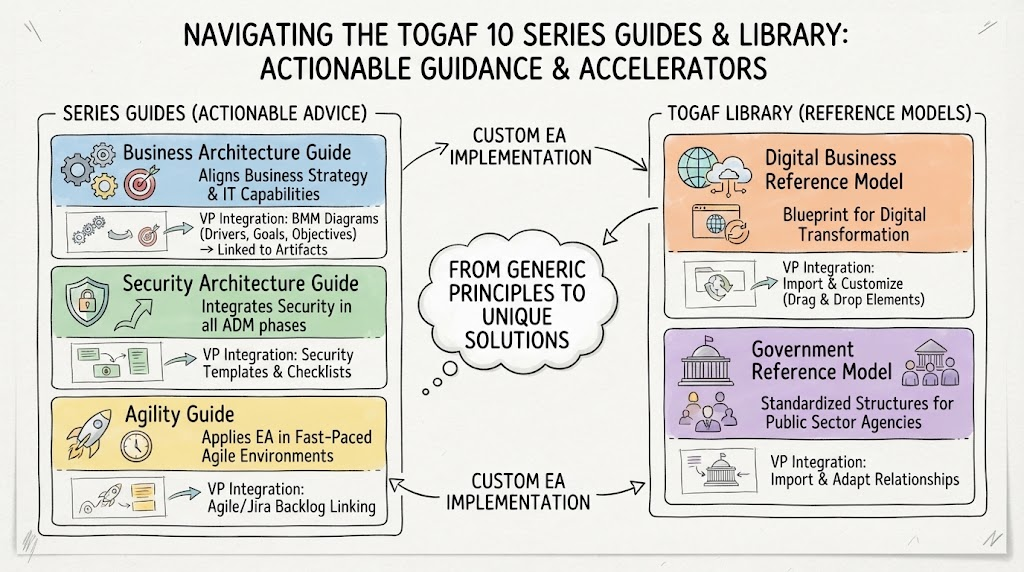
Making it Actionable: The Series Guides
The Series Guides expand on the core domains, providing detailed, practical advice. For example:
-
Business Architecture Guide: Helps align business strategy with IT capabilities.
-
Security Architecture Guide: Integrates security considerations into every phase of the ADM.
-
Agility Guide: Shows how to apply EA principles in fast-paced, agile environments.
Visual Paradigm Integration: VP offers pre-built templates for many of these guides. For instance, when working on the Business Architecture Guide, you can use VP’s Business Motivation Model (BMM) diagrams to capture drivers, goals, and objectives, then link them to technical artifacts in later phases.
Accelerating with the Library: Reference Models
The TOGAF Library provides industry-specific reference models that serve as starting points. Instead of building everything from scratch, organizations can adapt these models to their context.
-
Example: The Digital Business Reference Model provides a blueprint for digital transformation initiatives.
-
Example: The Government Reference Model offers standardized structures for public sector agencies.
Visual Paradigm Integration: VP allows you to import reference models directly into your project. You can then customize them by dragging and dropping elements, modifying relationships, and adding organization-specific details. This significantly reduces initial setup time.
Section 5: The “Choose Your Own Adventure” Beginner’s Adoption Strategy
Adopting TOGAF 10 doesn’t have to be an all-or-nothing endeavor. Here’s a practical guide for different roles:
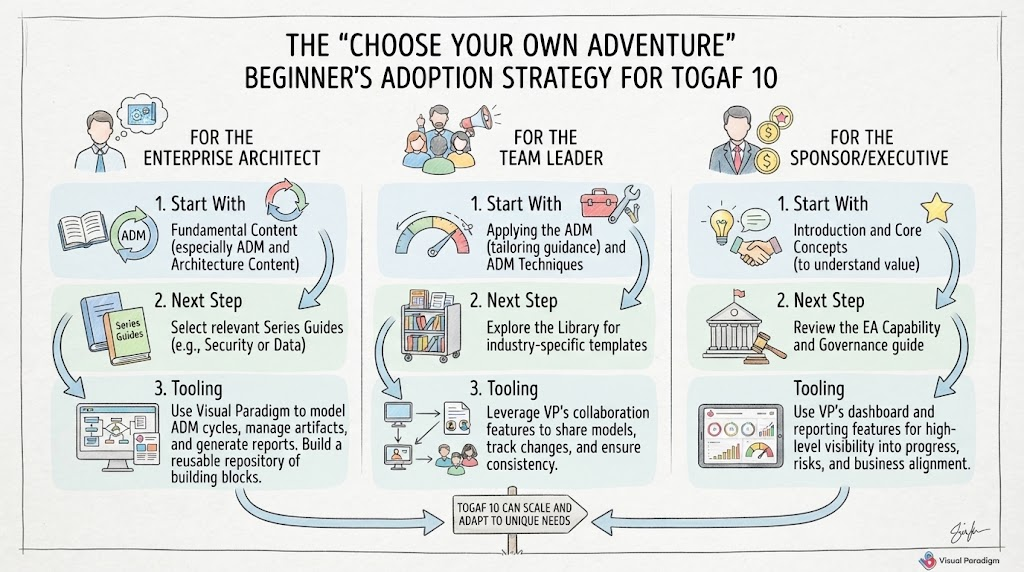
For the Enterprise Architect
-
Start With: Fundamental Content (especially ADM and Architecture Content).
-
Next Step: Select Series Guides relevant to your current projects (e.g., Security or Data).
-
Tooling: Use Visual Paradigm to model your ADM cycles, manage artifacts, and generate reports. Focus on building a reusable repository of building blocks.
For the Team Leader
-
Start With: Applying the ADM (tailoring guidance) and ADM Techniques.
-
Next Step: Explore the Library for industry-specific templates that can accelerate your team’s work.
-
Tooling: Leverage VP’s collaboration features to share models with your team, track changes, and ensure consistency across projects.
For the Sponsor/Executive
-
Start With: Introduction and Core Concepts (to understand the value proposition).
-
Next Step: Review the EA Capability and Governance guide to understand how to support and measure the EA function.
-
Tooling: Use VP’s dashboard and reporting features to get high-level visibility into architecture progress, risks, and alignment with business goals.
Key Concepts and Examples: Tooling with Visual Paradigm
To illustrate how TOGAF 10 concepts translate into practice, let’s look at a few key examples using Visual Paradigm.
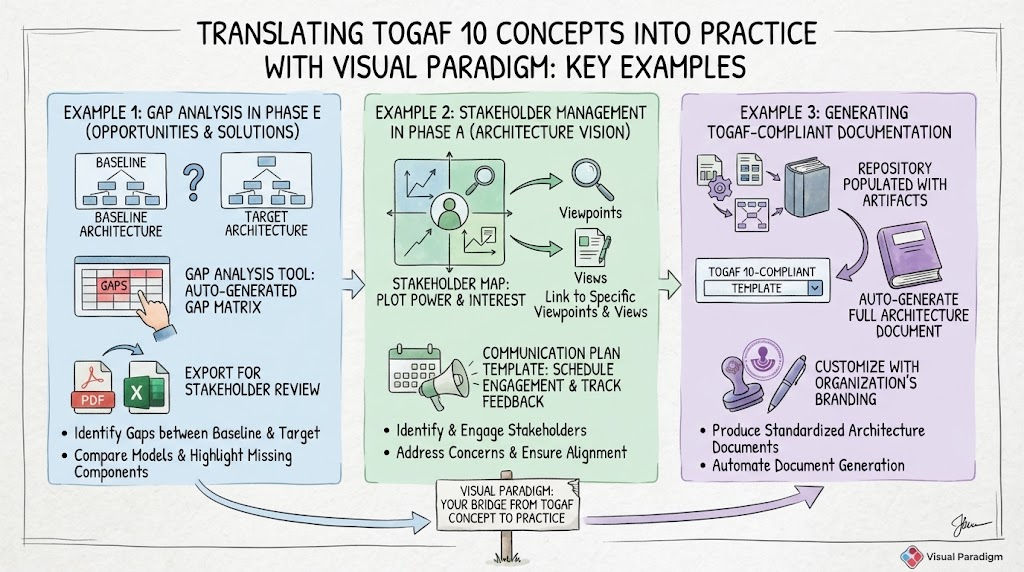
Example 1: Gap Analysis in Phase E (Opportunities and Solutions)
-
TOGAF Concept: Identify gaps between baseline and target architectures to determine necessary changes.
-
Visual Paradigm Action:
-
Create Baseline and Target Architecture diagrams in VP.
-
Use the Gap Analysis Tool to compare the two models.
-
VP automatically generates a Gap Matrix highlighting missing components, changed relationships, and new requirements.
-
Export the matrix as a PDF or Excel file for stakeholder review.
-
Example 2: Stakeholder Management in Phase A (Architecture Vision)
-
TOGAF Concept: Identify and engage stakeholders to ensure their concerns are addressed.
-
Visual Paradigm Action:
-
Create a Stakeholder Map diagram in VP.
-
Plot stakeholders based on their power and interest.
-
Link each stakeholder to specific Viewpoints and Views that address their concerns.
-
Use VP’s Communication Plan template to schedule engagements and track feedback.
-
Example 3: Generating TOGAF-Compliant Documentation
-
TOGAF Concept: Produce standardized architecture documents for governance and communication.
-
Visual Paradigm Action:
-
Complete your ADM phases and populate the repository with artifacts.
-
Use VP’s Document Engine to select a TOGAF 10-compliant template.
-
Auto-generate a full architecture document, including diagrams, catalogs, and matrices.
-
Customize the output with your organization’s branding and additional commentary.
-
Conclusion
TOGAF 10 represents a mature evolution of enterprise architecture standards, embracing modularity, flexibility, and practicality. By breaking down the standard into Fundamental Content, Series Guides, and a Library, it allows organizations to adopt EA in a way that fits their unique context and maturity level.
However, theory alone is not enough. To truly realize the benefits of TOGAF 10, practitioners need robust tooling. Visual Paradigm bridges the gap between concept and execution, providing intuitive interfaces for ADM navigation, artifact management, gap analysis, and documentation generation. By combining the structured guidance of TOGAF 10 with the powerful capabilities of Visual Paradigm, organizations can build sustainable, agile, and value-driven enterprise architecture practices.
Whether you are just starting your EA journey or looking to refine an existing practice, the modular nature of TOGAF 10 and the supportive ecosystem of tools like Visual Paradigm offer a clear path forward. Start small, focus on value, and iterate—just as the ADM intends.
References
-
Visual Paradigm TOGAF ADM Tool Tutorial: Official step-by-step guide covering the entire Architecture Development Method cycle with Visual Paradigm.
-
TOGAF ADM with Visual Paradigm – Getting Started: Introductory article on setting up TOGAF ADM projects and navigating the tool’s specific deliverables.
-
Visual Paradigm for Enterprise Architecture – TOGAF Features: Overview of key tooling features, including gap analysis, artifact generation, and stakeholder management.
-
How to Create TOGAF Architecture Deliverables using Visual Paradigm: Practical guide on producing ADM-compliant catalogs, matrices, and diagrams within the software.
-
Visual Paradigm TOGAF ADM Phase-by-Phase Walkthrough: Detailed breakdown of each ADM phase (Preliminary to Requirements Management) with tool-specific actions.
-
TOGAF Tool Comparison: Visual Paradigm vs. Others: Article justifying Visual Paradigm’s capabilities for ADM implementation against competitors like Sparx or Archi.
-
Using Visual Paradigm for TOGAF 9.2 Certification Preparation: Resource linking tool usage to learning ADM concepts for certification exams.
-
Visual Paradigm Enterprise Architecture – TOGAF ADM Repository: Article on using the tool’s repository to manage architecture building blocks and deliverables across ADM iterations.
-
TOGAF ADM Iteration Management with Visual Paradigm: Explanation of how to handle multiple ADM cycles and transition planning within the tool.
-
Visual Paradigm TOGAF Documentation Generation: Description of auto-generating TOGAF-compliant architecture documents from your ADM models.