


TOGAF ADM Case Study for Beginners
1. What Is TOGAF ADM?
TOGAF is a framework used to design and manage an organization’s enterprise architecture.
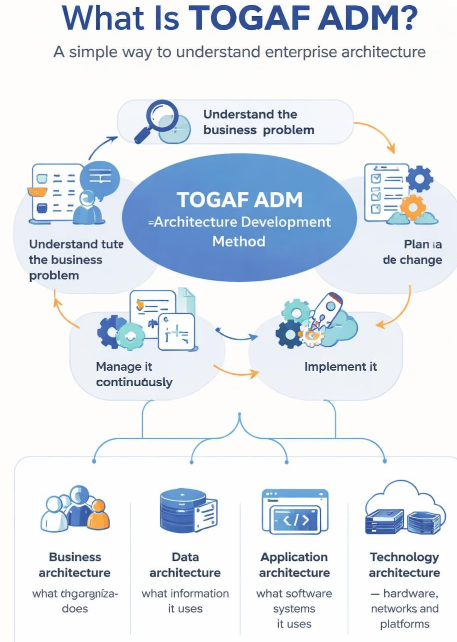
Enterprise architecture means understanding how these four parts of an organization work together:
-
Business architecture – what the organization does
-
Data architecture – what information it uses
-
Application architecture – what software systems it uses
-
Technology architecture – what hardware, networks, and technical platforms support the software
ADM stands for Architecture Development Method. It is the step-by-step process used in TOGAF to create and improve an architecture.
A simple way to think about TOGAF ADM is:
Understand the business problem → design a better future → plan the change → implement it → manage it continuously.
2. The Example Company
We will use a very simple fictional company.
Company: FreshMart
FreshMart is a small grocery store chain with five stores.
Customers can currently buy products only by visiting a physical store. Employees use separate systems for:
-
Sales
-
Inventory
-
Accounting
-
Supplier orders
These systems do not communicate well with one another.
Current Problems
FreshMart has several business problems:
-
Customers cannot order groceries online.
-
Employees sometimes sell products that are already out of stock.
-
Store managers prepare reports manually.
-
Supplier orders are sent by email.
-
The accounting team enters sales information manually.
-
Senior managers do not have a real-time view of sales.
-
Each store keeps some information separately.
Business Goal
FreshMart wants to:
Create an online grocery ordering service connected to inventory, payments, suppliers, and accounting.
The company expects this to:
-
Increase sales
-
Improve customer service
-
Reduce manual work
-
Reduce incorrect inventory information
-
Give managers better reports
We will use TOGAF ADM to plan this change.
3. Important Terms Before Starting
| Term | Simple meaning |
|---|---|
| Architecture | A structured plan showing how business, data, applications, and technology fit together |
| Baseline architecture | How things work today |
| Target architecture | How things should work in the future |
| Gap | The difference between the current situation and the desired future |
| Stakeholder | A person or group affected by the project |
| Deliverable | A document or result produced during the work |
| Capability | Something the organization must be able to do |
| Architecture repository | A place where architecture documents are stored |
| Governance | The process used to make sure work follows agreed rules |
4. The TOGAF ADM Cycle
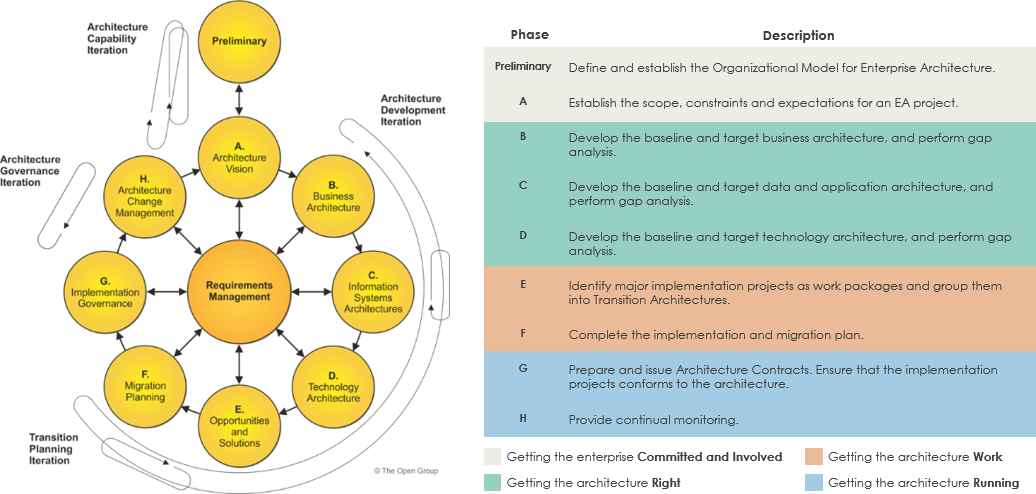
The ADM has the following main phases:
-
Preliminary Phase
-
Phase A: Architecture Vision
-
Phase B: Business Architecture
-
Phase C: Information Systems Architectures
-
Phase D: Technology Architecture
-
Phase E: Opportunities and Solutions
-
Phase F: Migration Planning
-
Phase G: Implementation Governance
-
Phase H: Architecture Change Management
-
Requirements Management, which operates throughout the cycle
The phases are not always completed only once. Organizations may repeat them when requirements change or when a new project begins.
5. Preliminary Phase: Prepare the Organization
Purpose
The Preliminary Phase prepares the organization to use architecture effectively.
It answers questions such as:
-
Who will manage architecture?
-
What principles will guide decisions?
-
Which people will participate?
-
What standards and methods will be used?
-
How will architecture decisions be approved?
FreshMart’s Situation
FreshMart has never used enterprise architecture before. The company decides to create a small architecture team.
The team includes:
-
Chief Information Officer
-
Business manager
-
Store manager
-
Finance manager
-
IT manager
-
Data analyst
-
External solution architect
Architecture Principles
The team agrees on the following principles.
Principle 1: Customer information must be consistent
Customer information should not be stored differently in every system.
Principle 2: Systems should share important data
Sales, inventory, payment, and accounting systems should exchange information automatically.
Principle 3: Security must be included from the beginning
Customer passwords, addresses, and payment information must be protected.
Principle 4: Prefer simple and reusable solutions
FreshMart should avoid creating five different solutions for the five stores.
Principle 5: Business needs come first
Technology choices must support business goals instead of being selected only because they are fashionable.
Main Output
The main outputs of this phase are:
-
Architecture team structure
-
Architecture principles
-
Architecture governance approach
-
Initial architecture framework
-
List of key stakeholders
Beginner-Friendly Explanation
The Preliminary Phase is like preparing a construction project before drawing the building.
Before designing a house, you need to know:
-
Who owns the project
-
What rules apply
-
What the budget is
-
Who approves decisions
-
What standards must be followed
6. Phase A: Architecture Vision
Purpose
Phase A creates a high-level description of the proposed change.
It answers:
-
Why is the project needed?
-
What problem will it solve?
-
Who will benefit?
-
What is included?
-
What is not included?
-
Do decision-makers support the project?
FreshMart’s Problem Statement
FreshMart currently loses online customers because it has no digital ordering service. Its disconnected systems also cause inventory errors and manual work.
Vision
FreshMart will provide one online grocery ordering service connected to:
-
Product information
-
Store inventory
-
Customer accounts
-
Online payments
-
Delivery or pickup scheduling
-
Accounting
-
Supplier ordering
Scope
Included
-
Customer website
-
Mobile-friendly ordering
-
Product catalog
-
Inventory visibility
-
Online payment
-
Order processing
-
Store pickup
-
Delivery scheduling
-
Sales reporting
-
Integration with accounting
Not included initially
-
International delivery
-
Loyalty rewards
-
Advanced artificial intelligence
-
Fully automated warehouses
-
Integration with every possible payment provider
Stakeholders
| Stakeholder | Main concern |
|---|---|
| Customers | Easy ordering and accurate product availability |
| Store employees | Simple order preparation |
| Store managers | Inventory and sales visibility |
| Finance team | Correct payment and accounting records |
| Suppliers | Accurate purchase orders |
| Senior management | Increased revenue and controlled costs |
| IT team | Secure, supportable systems |
Expected Benefits
FreshMart creates the following initial targets:
-
Increase sales by 15% within two years
-
Reduce inventory mistakes by 50%
-
Reduce manual accounting work
-
Allow customers to place orders at any time
-
Give managers daily sales reports
High-Level Business Value
The project is expected to:
-
Create a new sales channel
-
Improve customer satisfaction
-
Reduce errors
-
Make information available faster
-
Improve management decision-making
Main Outputs
-
Architecture Vision document
-
Statement of Architecture Work
-
Initial business case
-
High-level scope
-
Stakeholder map
-
Initial risk list
-
Approval to continue
Beginner-Friendly Explanation
Phase A is like presenting a simple picture of the proposed building to the owner.
You do not draw every electrical wire yet. You explain:
-
What the building will be
-
Why it is needed
-
How much area it covers
-
What benefits it provides
-
Whether the owner approves the idea
7. Phase B: Business Architecture
Purpose
Phase B describes how the business works today and how it should work in the future.
It focuses on:
-
Business processes
-
Business roles
-
Organizational structure
-
Business services
-
Business capabilities
-
Business goals
7.1 Current Business Process
Today, a customer buys groceries like this:
-
Customer visits a store.
-
Customer selects products.
-
Cashier scans products.
-
Payment is accepted.
-
Sales information is saved in the store sales system.
-
Inventory is updated later.
-
Store manager prepares a report manually.
This process works for in-store purchases, but it does not support online orders.
7.2 Future Business Process
In the future, an online customer will:
-
Visit the FreshMart website.
-
Search for products.
-
Add products to a shopping cart.
-
Confirm the order.
-
Pay online.
-
Select delivery or store pickup.
-
Receive confirmation.
-
Store employees prepare the order.
-
Customer receives or collects the order.
-
The system updates sales, inventory, and accounting automatically.
7.3 Business Capabilities
A capability is something FreshMart must be able to do.
| Capability | Current situation | Future need |
|---|---|---|
| Product management | Each store maintains some product information | One shared product catalog |
| Inventory management | Updates are sometimes delayed | Near-real-time inventory information |
| Online ordering | Does not exist | Customers can order online |
| Payment processing | Available only at store checkout | Secure online payment |
| Order fulfillment | Designed for in-store purchases | Staff can prepare online orders |
| Customer management | Limited information | Customer accounts and order history |
| Reporting | Mostly manual | Automated management dashboards |
| Supplier management | Orders sent by email | More automatic supplier ordering |
7.4 Business Roles
The future business process needs new or updated roles:
-
Online customer
-
Store employee
-
Order fulfillment employee
-
Store manager
-
Customer service representative
-
Finance employee
-
System administrator
7.5 Business Architecture Gaps
A gap is something missing between the current and future states.
| Current situation | Future requirement | Gap |
|---|---|---|
| No online ordering | Online ordering service | New ordering capability required |
| Separate product lists | Shared product catalog | Product data must be standardized |
| Delayed inventory updates | Accurate inventory availability | Inventory integration required |
| Manual reporting | Automated dashboards | Reporting capability required |
| Email supplier orders | Structured supplier orders | Supplier integration required |
| Store staff handle only walk-in shoppers | Staff prepare online orders | New operating process required |
7.6 Business Architecture Decisions
FreshMart decides to:
-
Create a centralized online ordering process
-
Use one product catalog for all stores
-
Treat inventory as a shared business capability
-
Introduce a standard order fulfillment process
-
Train store employees to process online orders
-
Create common reporting definitions for all stores
Main Outputs
-
Baseline business architecture
-
Target business architecture
-
Business process diagrams
-
Capability map
-
Organization and role descriptions
-
Business architecture gap analysis
-
Updated requirements
Beginner-Friendly Explanation
Phase B asks:
What does the business do today, and what must it be able to do in the future?
It does not yet decide exactly which database or programming language will be used. It starts with the business.
8. Phase C: Information Systems Architectures
Phase C covers two related areas:
-
Data Architecture
-
Application Architecture
8.1 Data Architecture
Purpose
Data Architecture describes:
-
What information the organization needs
-
Where the information comes from
-
Where it is stored
-
How systems share it
-
Who owns it
-
How it is protected
FreshMart’s Important Data
FreshMart needs to manage:
-
Customer data
-
Product data
-
Inventory data
-
Order data
-
Payment data
-
Supplier data
-
Store data
-
Employee data
-
Delivery data
Data Ownership
| Data | Owner |
|---|---|
| Customer data | Customer service manager |
| Product data | Merchandising manager |
| Inventory data | Operations manager |
| Payment records | Finance manager |
| Supplier data | Purchasing manager |
| Employee data | Human resources manager |
Example: Customer Order
An order might contain:
Order number: FM-10025
Customer: Aisha Khan
Store: FreshMart Central
Products:
  - Apples: 2 kg
  - Milk: 2 cartons
  - Bread: 1 loaf
Total: $24.50
Payment status: Paid
Order status: Ready for pickup
The order must be understood consistently by:
-
The website
-
The payment service
-
The store system
-
The inventory system
-
The accounting system
-
The reporting system
Data Problems Today
-
Product names differ between stores.
-
Some products have different product codes.
-
Inventory quantities are not always updated immediately.
-
Customer information is stored in multiple places.
-
Reports use different definitions of “sales.”
Target Data Design
FreshMart decides that:
-
Each product will have one standard product code.
-
Each customer will have one customer record.
-
Each order will have one unique order number.
-
Inventory quantities will be associated with specific stores.
-
Payment data will be handled by a secure payment provider.
-
Standard data definitions will be documented.
Data Architecture Gap Analysis
| Current state | Target state | Required action |
|---|---|---|
| Different product codes | One product code standard | Clean and standardize product data |
| Multiple customer records | Central customer record | Create a shared customer service |
| Delayed inventory information | Connected inventory information | Integrate inventory systems |
| Different sales definitions | Common reporting definitions | Create a data glossary |
| Payment information handled internally | Payment provider handles sensitive data | Use secure payment integration |
8.2 Application Architecture
Purpose
Application Architecture describes the software applications needed to support the business and data.
Current Applications
FreshMart currently uses:
-
Store checkout system
-
Inventory spreadsheet
-
Accounting application
-
Supplier email process
-
Separate reporting spreadsheets
Problems with the Current Applications
-
The systems do not share information easily.
-
Employees enter the same information more than once.
-
Spreadsheets are difficult to control.
-
There is no online ordering application.
-
Reporting is slow and inconsistent.
Target Applications
FreshMart plans to use the following application components:
-
Online Storefront
Allows customers to browse and order products. -
Customer Account Service
Stores customer profiles and order history. -
Product Catalog Service
Stores standard product information. -
Inventory Management System
Shows available stock by store. -
Order Management System
Tracks orders from creation to completion. -
Payment Service
Processes online payments. -
Notification Service
Sends emails or text messages to customers. -
Accounting System
Receives sales and payment information. -
Reporting Platform
Produces sales and inventory reports. -
Supplier Management Service
Supports purchase orders and supplier communication.
Simple Application Flow
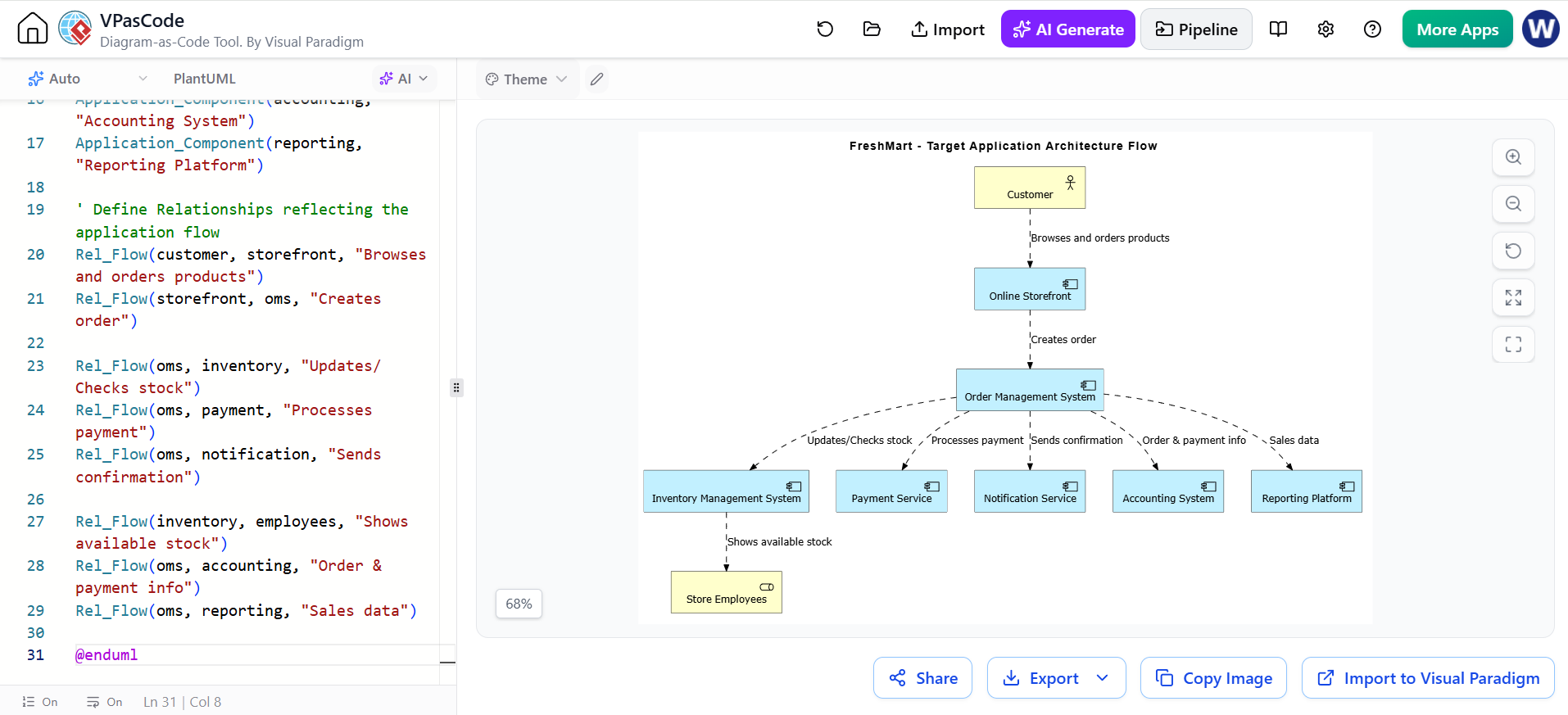
@startuml
!include <archimate/Archimate>

title FreshMart - Target Application Architecture Flow

' Define Business & Actor Elements
Business_Actor(customer, "Customer")
Business_Role(employees, "Store Employees")

' Define Application Components
Application_Component(storefront, "Online Storefront")
Application_Component(oms, "Order Management System")
Application_Component(inventory, "Inventory Management System")
Application_Component(payment, "Payment Service")
Application_Component(notification, "Notification Service")
Application_Component(accounting, "Accounting System")
Application_Component(reporting, "Reporting Platform")

' Define Relationships reflecting the application flow
Rel_Flow(customer, storefront, "Browses and orders products")
Rel_Flow(storefront, oms, "Creates order")

Rel_Flow(oms, inventory, "Updates/Checks stock")
Rel_Flow(oms, payment, "Processes payment")
Rel_Flow(oms, notification, "Sends confirmation")

Rel_Flow(inventory, employees, "Shows available stock")
Rel_Flow(oms, accounting, "Order & payment info")
Rel_Flow(oms, reporting, "Sales data")

@enduml
Application Architecture Decisions
FreshMart decides:
-
The website will not directly modify inventory.
-
The Order Management System will coordinate orders.
-
The payment provider will process card payments.
-
The reporting platform will receive information from operational systems.
-
Existing accounting software will be retained if it can be integrated.
-
Applications should use standard interfaces instead of manual file transfers where possible.
Main Outputs of Phase C
-
Data Architecture document
-
Application Architecture document
-
Data entity descriptions
-
Application interaction diagrams
-
Integration requirements
-
Data ownership rules
-
Application gap analysis
-
Updated requirements
Beginner-Friendly Explanation
Data Architecture asks:
What information do we need, and how should it be organized?
Application Architecture asks:
What software do we need to perform the work and manage the information?
9. Phase D: Technology Architecture
Purpose
Phase D defines the technology environment needed to support the business, data, and applications.
It includes:
-
Servers
-
Networks
-
Cloud platforms
-
Operating systems
-
Databases
-
Security technologies
-
Backup systems
-
Monitoring tools
-
Integration technologies
Current Technology
FreshMart currently has:
-
A server in each store
-
Basic store networks
-
Local databases
-
Office computers
-
Manual backups
-
Limited monitoring
-
No central integration platform
Target Technology
FreshMart chooses a cloud-based environment.
The target technology includes:
-
Cloud hosting
-
Central databases
-
Secure internet connections
-
Identity and access management
-
Encrypted communication
-
Automated backups
-
System monitoring
-
Central logging
-
Integration interfaces
-
Disaster recovery capability
Simple Technology View
Customers and Employees
          |
          v
      Internet
          |
          v
   Secure Cloud Network
          |
   ---------------------
   |         |         |
Web Apps   Databases  APIs
                     |
        -------------------------
        |           |           |
   Inventory   Accounting   Payment
Technology Requirements
The technology must support:
-
24-hour online ordering
-
Secure customer login
-
High availability during busy periods
-
Automatic backups
-
Recovery after a system failure
-
Protection against unauthorized access
-
Monitoring and alerts
-
Support for all five stores
Technology Gap Analysis
| Current state | Target state | Gap |
|---|---|---|
| Separate store servers | Central cloud environment | Move or connect systems |
| Manual backups | Automated backups | Implement backup service |
| Limited security controls | Central identity and access management | Add security platform |
| No central monitoring | Continuous monitoring | Deploy monitoring tools |
| Store-specific networks | Secure shared connectivity | Improve network design |
| Manual system integration | Standard interfaces | Build integration capability |
Main Outputs
-
Baseline Technology Architecture
-
Target Technology Architecture
-
Network design
-
Infrastructure design
-
Security requirements
-
Technology standards
-
Technology gap analysis
-
Updated requirements
Beginner-Friendly Explanation
Phase D asks:
What technical foundation is required to run the future business and software?
The technology must support the architecture, not the other way around.
10. Phase E: Opportunities and Solutions
Purpose
Phase E turns the target architecture into possible solutions and projects.
It answers:
-
What major solution should be created?
-
Which parts can be delivered together?
-
Should FreshMart build, buy, or subscribe to a system?
-
What projects are needed?
-
What is the recommended approach?
Possible Solution Options
FreshMart considers three options.
| Option | Description | Advantages | Disadvantages |
|---|---|---|---|
| Build everything | Create all applications internally | Highly customizable | Expensive and slow |
| Buy a complete package | Purchase one grocery platform | Faster initial implementation | May not fit every need |
| Combine products and custom integration | Buy common systems and connect them | Balanced approach | Requires integration work |
FreshMart chooses the third option:
Buy standard products where possible and build only the features that are unique to FreshMart.
Proposed Work Packages
Work Package 1: Product and Inventory Standardization
-
Create standard product codes
-
Clean product data
-
Connect store inventory systems
-
Define inventory rules
Work Package 2: Online Ordering
-
Create customer website
-
Create shopping cart
-
Create customer account functionality
-
Create online checkout
Work Package 3: Order Fulfillment
-
Create order preparation process
-
Provide store employee screens
-
Add pickup and delivery scheduling
-
Add customer notifications
Work Package 4: Payment and Accounting Integration
-
Connect payment provider
-
Send payment information to accounting
-
Reconcile transactions
Work Package 5: Reporting
-
Create sales dashboard
-
Create inventory dashboard
-
Create management reports
Architecture Roadmap
Current State
     |
     v
Data cleanup and standards
     |
     v
Inventory integration
     |
     v
Online ordering pilot
     |
     v
Payment and accounting integration
     |
     v
All-store rollout
     |
     v
Advanced reporting and supplier automation
Main Outputs
-
Solution building blocks
-
Work packages
-
High-level implementation roadmap
-
Transition architectures
-
Initial implementation approach
-
Project recommendations
Beginner-Friendly Explanation
Phase E asks:
What actual solutions and projects will move us from today to the desired future?
It changes the architecture from a design into a practical plan.
11. Phase F: Migration Planning
Purpose
Phase F creates a detailed plan for moving from the current architecture to the target architecture.
It covers:
-
Project priorities
-
Costs and benefits
-
Risks
-
Dependencies
-
Timelines
-
Resources
-
Implementation order
Why FreshMart Cannot Do Everything at Once
If FreshMart changes every system simultaneously, it may create too much risk.
The company therefore chooses a gradual approach.
Migration Principles
FreshMart agrees to:
-
Start with a small pilot
-
Avoid changing all stores at once
-
Test the solution before expansion
-
Protect daily store operations
-
Train employees before rollout
-
Measure results after each stage
Migration Phases
| Stage | Activities | Result |
|---|---|---|
| Stage 1 | Clean product and inventory data | Reliable basic information |
| Stage 2 | Connect inventory for one pilot store | Test inventory integration |
| Stage 3 | Launch online ordering for pilot store | Test customer ordering |
| Stage 4 | Add payment and notifications | Complete basic online journey |
| Stage 5 | Add accounting integration | Reduce manual finance work |
| Stage 6 | Expand to remaining stores | Company-wide service |
| Stage 7 | Add supplier automation and advanced reporting | Improve efficiency |
Example Project Priorities
| Project | Business value | Difficulty | Priority |
|---|---|---|---|
| Product data cleanup | High | Medium | Very high |
| Online ordering pilot | High | Medium | Very high |
| Inventory integration | High | High | Very high |
| Advanced customer loyalty | Medium | Medium | Later |
| Artificial intelligence recommendations | Low initially | High | Later |
| Supplier automation | Medium | Medium | After core rollout |
Business Case
Expected Costs
-
Software subscriptions
-
Integration development
-
Cloud hosting
-
Employee training
-
Data cleanup
-
Security improvements
-
Support and maintenance
Expected Benefits
-
More online revenue
-
Fewer inventory mistakes
-
Less manual data entry
-
Faster reporting
-
Improved customer convenience
-
Better supplier planning
Risk Example
Risk
Inventory information may be inaccurate during the pilot.
Impact
Customers may order products that are unavailable.
Response
-
Begin with one store
-
Perform frequent inventory checks
-
Display limited product quantities online
-
Train employees
-
Monitor failed orders
-
Correct data before expanding
Main Outputs
-
Detailed Implementation and Migration Strategy
-
Prioritized projects
-
Implementation schedule
-
Cost and benefit analysis
-
Risk analysis
-
Resource plan
-
Migration roadmap
Beginner-Friendly Explanation
Phase F answers:
In what order should we make the changes, and how can we reduce risk?
It is similar to planning a house renovation while continuing to live in the house.
12. Phase G: Implementation Governance
Purpose
Phase G ensures that implementation follows the approved architecture.
Architecture teams normally design the direction, but project teams build the actual solution. Phase G connects these two groups.
FreshMart Governance Activities
The architecture team reviews:
-
Whether the online store uses approved security controls
-
Whether product codes follow the data standard
-
Whether applications use approved interfaces
-
Whether customer information is protected
-
Whether cloud resources follow technology standards
-
Whether the solution matches the approved architecture
Example Architecture Review
The development team proposes storing customer passwords in plain text.
The architecture team rejects the proposal because it violates:
-
Security principles
-
Data protection requirements
-
Identity management standards
The team must use secure password storage through an approved identity service.
Architecture Compliance Review
| Area | Review question | Result |
|---|---|---|
| Business | Does the system support online ordering? | Approved |
| Data | Are product codes standardized? | Needs correction |
| Application | Does the order system integrate with inventory? | Approved |
| Technology | Is communication encrypted? | Approved |
| Security | Are user permissions properly controlled? | Needs testing |
| Operations | Can employees support the system? | Training required |
Change Requests
During implementation, the project team asks to add a loyalty rewards feature.
The architecture board evaluates:
-
Does it support the current business goals?
-
Will it delay the launch?
-
Does it require new customer data?
-
Does it create security or privacy concerns?
-
Is the budget available?
The decision is to place the feature in a later release.
Main Outputs
-
Architecture compliance reviews
-
Governance decisions
-
Approved exceptions
-
Updated architecture documents
-
Change records
-
Implementation guidance
Beginner-Friendly Explanation
Phase G asks:
Is the project being built according to the approved plan?
It helps prevent a project from slowly becoming different from the architecture that was approved.
13. Phase H: Architecture Change Management
Purpose
Phase H manages future changes after the architecture has been implemented.
Business and technology constantly change. FreshMart may later need to respond to:
-
New competitors
-
New laws
-
New customer expectations
-
New payment methods
-
New delivery models
-
New technology
-
Business expansion
Example Change
One year after launch, FreshMart decides to offer same-day delivery.
This change may require:
-
Delivery partner integration
-
Delivery time-slot management
-
Driver tracking
-
New customer notifications
-
Delivery pricing
-
Changes to order fulfillment
-
Additional customer data
-
New support processes
The architecture team assesses the change.
Change Assessment Questions
-
What business capability is changing?
-
Which systems are affected?
-
Which data is required?
-
Does the technology support the change?
-
What new risks exist?
-
Does the architecture need to be updated?
-
Should a new ADM cycle begin?
Types of Changes
Minor change
Example: Add a new sales report.
This may require a small architecture review.
Significant change
Example: Add a loyalty program using customer purchase history.
This may require updates to:
-
Business Architecture
-
Data Architecture
-
Application Architecture
-
Security controls
Major change
Example: Expand FreshMart into another country.
This may require a new ADM cycle covering:
-
New regulations
-
New currencies
-
New suppliers
-
New languages
-
New business processes
-
New technology requirements
Main Outputs
-
Change requests
-
Impact assessments
-
Updated architecture roadmap
-
Revised architecture documents
-
Decision on whether to start a new ADM cycle
Beginner-Friendly Explanation
Phase H asks:
What has changed, and does our architecture still make sense?
Architecture is not a document created once and then forgotten. It must evolve with the organization.
14. Requirements Management
Requirements Management operates throughout every ADM phase.
A requirement is something the organization needs.
FreshMart Requirements
Business requirements
-
Customers must be able to order online.
-
Store employees must be able to prepare orders.
-
Managers must see sales information.
Data requirements
-
Each product must have a unique code.
-
Inventory must be associated with a store.
-
Orders must have unique order numbers.
Application requirements
-
Customers must search for products.
-
Customers must add products to a cart.
-
Employees must update order status.
Technology requirements
-
The service must be available during store operating hours.
-
Data must be backed up.
-
Connections must be secure.
Security requirements
-
Customers must log in securely.
-
Employees must see only the information necessary for their jobs.
-
Administrative access must be controlled and monitored.
Requirement Traceability
FreshMart links each requirement to the architecture and implementation work.
| Requirement | Architecture area | Project |
|---|---|---|
| Customers can order online | Business and Application | Online ordering |
| Inventory is accurate | Data and Application | Inventory integration |
| Payments are secure | Technology and Security | Payment integration |
| Managers see sales reports | Application and Data | Reporting |
| Employees prepare online orders | Business and Application | Order fulfillment |
Why Requirements Management Matters
Requirements can change.
For example, customers may request:
Allow customers to substitute unavailable products.
This new requirement must be assessed against:
-
Business processes
-
Order management
-
Inventory data
-
Customer notifications
-
Employee procedures
-
Application design
If the requirement is approved, the architecture and project plan must be updated.
15. Complete FreshMart Architecture Summary
Baseline Architecture
FreshMart has:
-
Physical store sales
-
Separate store systems
-
Manual inventory updates
-
Email-based supplier ordering
-
Spreadsheet reporting
-
No online ordering
Target Architecture
FreshMart will have:
-
Online ordering
-
Shared product catalog
-
Connected inventory
-
Central order management
-
Online payments
-
Automated notifications
-
Accounting integration
-
Management dashboards
-
Improved security and monitoring
Main Gaps
-
Missing online ordering capability
-
Inconsistent product data
-
Disconnected inventory systems
-
Manual reports
-
Limited integration
-
Weak central monitoring
-
New employee training requirements
Main Projects
-
Product data cleanup
-
Inventory integration
-
Online ordering
-
Payment integration
-
Accounting integration
-
Order fulfillment
-
Reporting
-
Security improvements
-
Employee training
-
Supplier automation
16. Example ADM Deliverables
| ADM phase | Example FreshMart deliverables |
|---|---|
| Preliminary | Architecture principles, governance model, architecture team |
| Phase A | Architecture Vision, scope, business case |
| Phase B | Business process models, capability map, business gaps |
| Phase C | Data model, application architecture, integration design |
| Phase D | Technology architecture, infrastructure design, security requirements |
| Phase E | Solution options, work packages, transition architectures |
| Phase F | Migration roadmap, project priorities, cost-benefit analysis |
| Phase G | Compliance reviews, implementation decisions, exception records |
| Phase H | Change assessments, updated roadmap, new architecture cycles |
| Requirements Management | Requirement list, traceability matrix, change records |
17. How the ADM Phases Connect
The phases build on one another.
Business goal
     |
     v
Architecture Vision
     |
     v
Business Architecture
     |
     v
Data and Application Architecture
     |
     v
Technology Architecture
     |
     v
Solutions and Projects
     |
     v
Migration Plan
     |
     v
Implementation Governance
     |
     v
Continuous Change Management
For FreshMart:
"We need online sales"
          |
          v
"Customers need online ordering"
          |
          v
"We need order, inventory, payment, and customer systems"
          |
          v
"We need secure cloud technology and integrations"
          |
          v
"We will launch one pilot store first"
          |
          v
"We will review implementation quality"
          |
          v
"We will improve the architecture as the business grows"
18. What a Beginner Should Remember
The most important ideas are:
-
Start with the business problem.
Do not begin by choosing technology. -
Understand the current situation.
This is the baseline architecture. -
Describe the desired future.
This is the target architecture. -
Identify the gaps.
Gaps show what must change. -
Design business, data, applications, and technology together.
-
Turn architecture into practical projects.
-
Implement gradually when the change is large.
-
Keep checking whether projects follow the architecture.
-
Manage requirements throughout the process.
-
Repeat the ADM when the business or technology changes.
19. TOGAF ADM in One Simple Sentence
For the FreshMart example, TOGAF ADM can be summarized as:
FreshMart first understands its business problem, designs the required business processes and systems, plans the migration, controls implementation, and continuously updates the architecture as the company changes.
That is the basic idea of TOGAF ADM: a structured way to move from the current organization to a better future organization.