
Introduction
for aligning business goals with IT infrastructure. However, creating detailed ArchiMate diagrams—essential for visualizing complex relationships—has traditionally been a time-consuming, manual process. revolutionizes this workflow by enabling instant, AI-driven creation of ArchiMate diagrams and official viewpoints, while still allowing for manual refinement.
This tutorial will guide you through:
- How the AI Diagram Generator works
- Why AI + manual editing is superior to AI-only generation
- Step-by-step instructions for generating and customizing ArchiMate diagrams
- Practical use cases and examples
1. The Power of AI in ArchiMate Diagram Generation
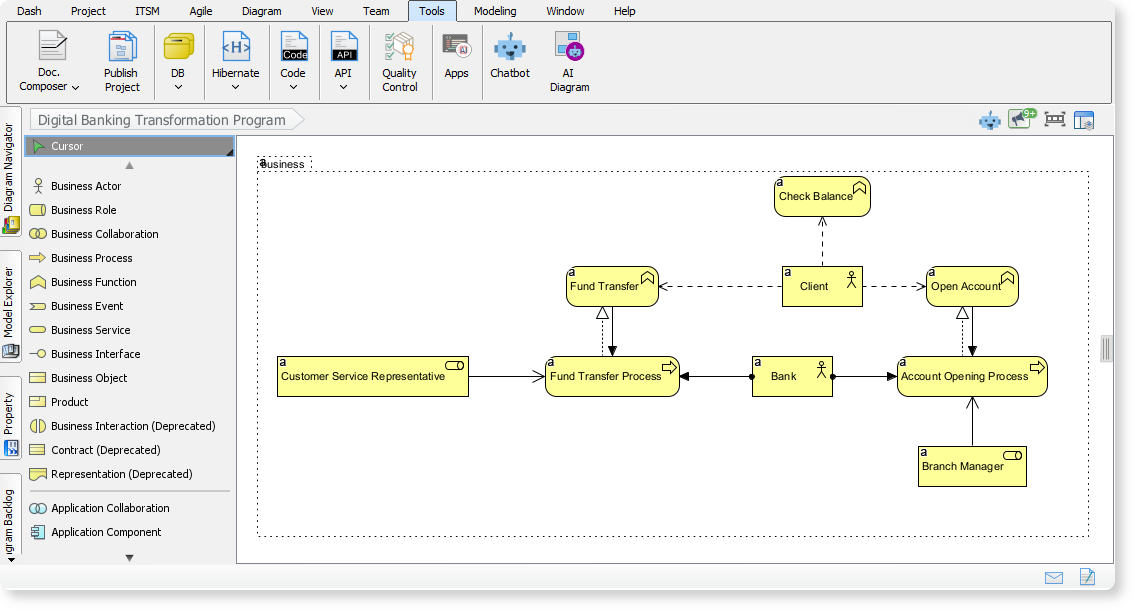
What’s New in Visual Paradigm Desktop?
The latest update introduces , which:
- Instantly creates fully compliant ArchiMate models from high-level prompts.
- Supports all official ArchiMate viewpoints, ensuring diagrams are tailored for specific stakeholders.
- Reduces manual effort, allowing architects to focus on strategy and validation.
Key Features
| Feature | Benefit |
|---|---|
| AI-Generated Diagrams | Enter a topic or requirement, and the AI drafts a comprehensive model. |
| Official Viewpoints | Choose from 20+ viewpoints (e.g., Business Process, Technology Usage, Capability Map). |
| Customizable Output | Define audience (e.g., engineers, executives) and tone (e.g., formal, technical). |
| Editable Drafts | Refine and fact-check AI-generated models to align with organizational standards. |
2. Why AI + Manual Editing Outperforms AI-Only Generation
Limitations of AI-Only Generation
- Non-editable outputs may not fully match user needs.
- Lack of context can lead to generic or inaccurate diagrams.
- No flexibility for unique organizational requirements.
Advantages of AI + Manual Editing
| AI-Only Generation | AI + Manual Editing |
|---|---|
| Fixed, non-editable output | Editable, customizable drafts |
| Generic, one-size-fits-all | Tailored to specific stakeholders |
| Limited accuracy | Human validation ensures precision |
| No room for refinement | Iterative improvement possible |
Result: , relevance, and alignment with business goals.
3. Step-by-Step Guide: Generating ArchiMate Diagrams with AI
Step 1: Access the AI Diagram Generator
- Open Visual Paradigm Desktop.
- Click Tools > AI Diagram.
Step 2: Select an ArchiMate Viewpoint
- Choose from the dropdown menu (e.g., Product Viewpoint, Technology Usage, Business Process).
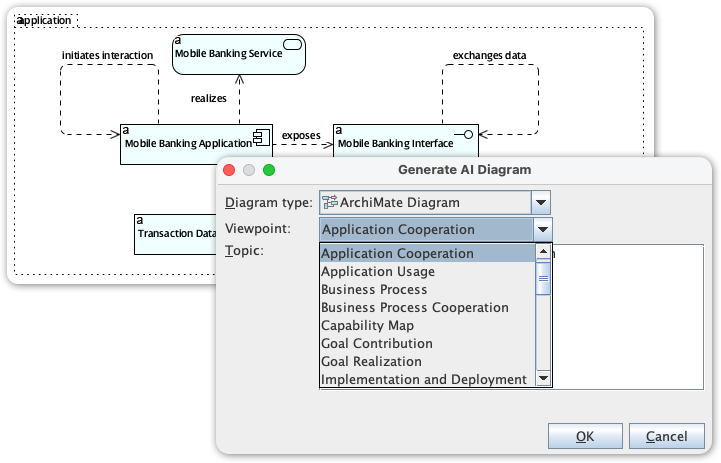
Step 3: Enter a Topic
- Example prompts:
- “Telecom 5G Network Rollout Architecture”
- “Digital Banking Transformation Program”
- “Healthcare Information Exchange Platform”
Step 4: Generate and Customize
- Click OK to generate the diagram.
- Edit the draft to refine elements, adjust relationships, or add details.
Step 5: Export and Share
- Save the diagram in your preferred format (e.g., PNG, SVG).
- Share with stakeholders for feedback.
4. Practical Use Cases
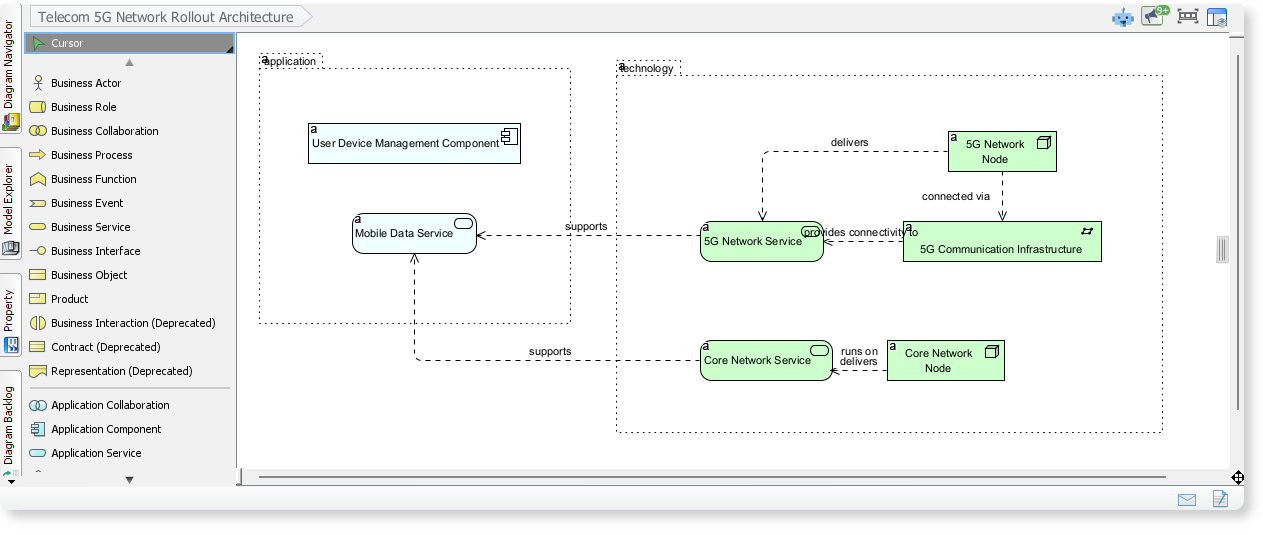
Example 1: Telecom 5G Network Rollout
- Prompt: “Telecom 5G Network Rollout Architecture”
- Output: A diagram showing application services, network services, and infrastructure elements working together for 5G connectivity.
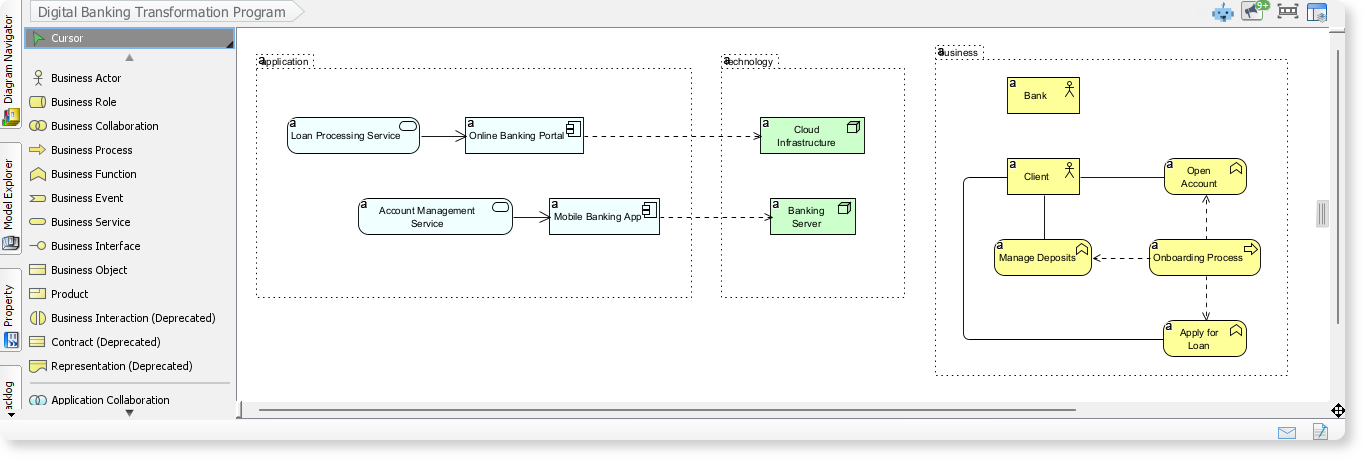
Example 2: Digital Banking Transformation
- Prompt: “Digital Banking Transformation Program”
- Output: A model illustrating business processes, application services, and technology components in digital banking.
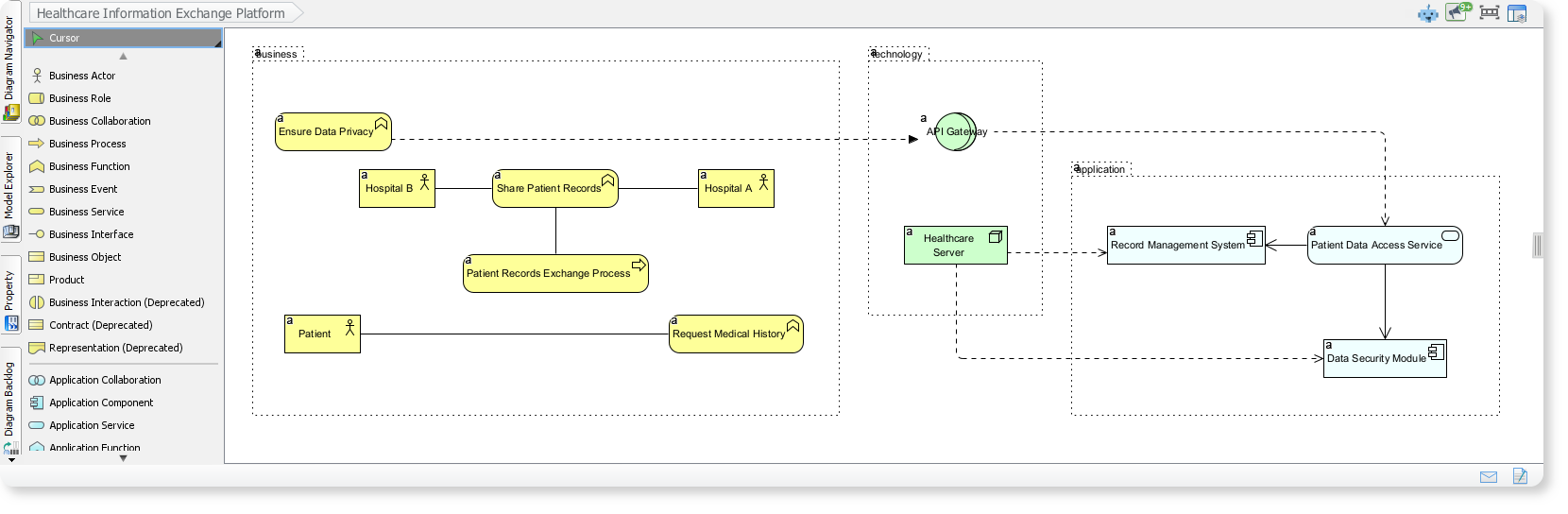
Example 3: Healthcare Information Exchange
- Prompt: “Healthcare Information Exchange Platform”
- Output: A visualization of how hospitals, patients, and applications collaborate to exchange medical records securely.
5. Best Practices for AI-Assisted EA Modeling
For Architects:
- Use AI to draft initial models quickly.
- Manually refine to ensure accuracy and relevance.
- Leverage viewpoints to tailor diagrams for different stakeholders.
For Teams:
- Collaborate on AI-generated drafts.
- Validate diagrams with subject matter experts.
- Iterate based on feedback.
Conclusion
Visual Paradigm Desktop’s AI Diagram Generator transforms Enterprise Architecture by combining the speed of AI with the precision of manual editing. This hybrid approach ensures diagrams are fast to create, accurate, and fully customizable—meeting the needs of modern, agile teams.
Ready to try it? Upgrade to the latest version of Visual Paradigm Desktop and experience AI-powered ArchiMate modeling today!
Question: Are there specific viewpoints or use cases you’d like to explore further?
Resources and Articles on Visual Paradigm Enterprise Architecture (EA) Visual Modeling Features
Visual Paradigm is a powerful tool for enterprise architecture modeling, supporting standards like ArchiMate, TOGAF, BPMN, and UML. Below is a curated list of resources, including official guides, tutorials, and articles highlighting its visual modeling capabilities such as diagram creation, ArchiMate integration, TOGAF ADM workflows, and general EA visualization techniques. These cover features like intuitive diagramming, relationship mapping, and stakeholder views.
- Learning Guides Overview Comprehensive hub for tutorials on visual modeling, including EA with TOGAF and ArchiMate. Covers diagram layout, element selection, and pinning for precise visualizations. URL: https://www.visual-paradigm.com/guide/
- Comprehensive Guide to Adopting Visual Paradigm for Enterprise Architecture (EA) Modeling Detailed article on key ArchiMate features in Visual Paradigm, benefits for EA adoption, and practical implementation steps for visual modeling. URL: https://archimate.visual-paradigm.com/2025/02/04/comprehensive-guide-to-adopting-visual-paradigm-for-enterprise-architecture-ea-modeling/
- Step-by-Step Enterprise Architecture Tutorial with TOGAF ADM Hands-on tutorial demonstrating Visual Paradigm’s visual modeling for TOGAF phases, including business, data, and technology architecture diagrams. URL: https://www.visual-paradigm.com/guide/enterprise-architecture/step-by-step-enterprise-architecture-tutorial-with-togaf-adm/
- ArchiMate Resources for FREE Free resources on using ArchiMate as a visual language in Visual Paradigm for capturing EA relationships and visualizations. URL: https://archimate.visual-paradigm.com/
- Visualizing Enterprise Architecture: A Practical Guide to ArchiMate and TOGAF Practical guide focusing on Visual Paradigm’s user-friendly interface for ArchiMate diagrams, stakeholder presentations, and EA visualization examples. URL: https://archimate.visual-paradigm.com/2025/02/18/visualizing-enterprise-architecture-a-practical-guide-to-archimate-and-togaf/
- Free UML, BPMN, and Agile Tutorials Collection of step-by-step tutorials on visual modeling techniques, including BPMN for business processes and UML for EA components in Visual Paradigm. URL: https://www.visual-paradigm.com/tutorials/
- General Modeling Techniques in Visual Paradigm Official user guide on core visual modeling features like diagram layout, element selection, and connector management for EA models. URL: https://www.visual-paradigm.com/support/documents/vpuserguide/1283/28_generalmodel.html
- Visual Paradigm Guides Hub Centralized site with guides on AI-assisted diagram generation and advanced EA modeling features in Visual Paradigm. URL: https://guides.visual-paradigm.com/
- Simplify Business Process Modeling with Visual Paradigm’s BPMN Tools Article exploring BPMN visual modeling for EA, including analysis and refinement tools in Visual Paradigm. URL: https://www.cybermedian.com/simplify-business-process-modeling-with-visual-paradigms-bpmn-tools/
These resources are up-to-date as of December 2025 and focus on practical, visual aspects of EA modeling. For hands-on practice, start with the free tutorials on the Visual Paradigm site.